What you need
- Windows 10 or 11 with Stream Deck software 7.1 or newer.
- A Stream Deck, Stream Deck XL, Stream Deck +, Stream Deck Mini, Stream Deck Neo or a Corsair Galleon 100 SD.
- Fallout 4 1.11.240 on the same PC. We test with the Steam version.
- F4SE 0.7.9 and the Pip-Boy Companion App Enabler (AE) mod (below). Both are other people's work, from their own pages. Nothing of ours goes into the game.
1. Install the plugin
Submitted for approval. Commonwealth Deck 1.0.0 is with the Elgato Marketplace. This page will link to the listing when it is up.
2. Set up the game
Fallout 4 has a server built in for its Pip-Boy companion app, the one the phone app used. A small mod turns it on, and Commonwealth Deck connects to it on your PC. Set it up once:
- Check that your game is Fallout 4 1.11.240: right-click
Fallout4.exein the game folder, then Properties, Details. The F4SE below is built for that version. - Install F4SE 0.7.9, the Fallout 4 Script Extender, from
f4se.silverlock.org: copy
f4se_loader.exe,f4se_1_11_240.dlland theData\Scriptsfolder into your Fallout 4 folder, or install it with your mod manager. - Install the Pip-Boy Companion App Enabler (AE) mod from
Nexus Mods with your mod manager, so that
Data\is in the game folder. It needs nothing else.F4SE\ Plugins\ PipboyAppFix.dll - Start the game through F4SE:
f4se_loader.exein the game folder, or your mod manager's F4SE tool. The Play button in Steam starts the game without F4SE, and then without the mod. - If Windows asks whether to let Fallout 4 through the firewall, allow it on Private networks. The game's app server needs it.
- Load a save and open the Pip-Boy once. The game starts sending its data then, and the keys come alive.
Without the game the keys say what is missing instead of going blank: game not running, Pip-Boy app not on, open your Pip-Boy once, another app connected or at the menu. Every key's settings also show whether the game's Pip-Boy app is live, and list the controls that have no key yet. If something is not right, see Troubleshooting.
3. The Commonwealth Deck key and its layout
Drag the Commonwealth Deck key onto any profile and press it: your deck opens a ready-made layout with six pages, with Back at the bottom left of every page.
- Explore: health, AP, where you are and the time, your weapon, sneak, the Pip-Boy light and a Stimpak, and the way to the other pages.
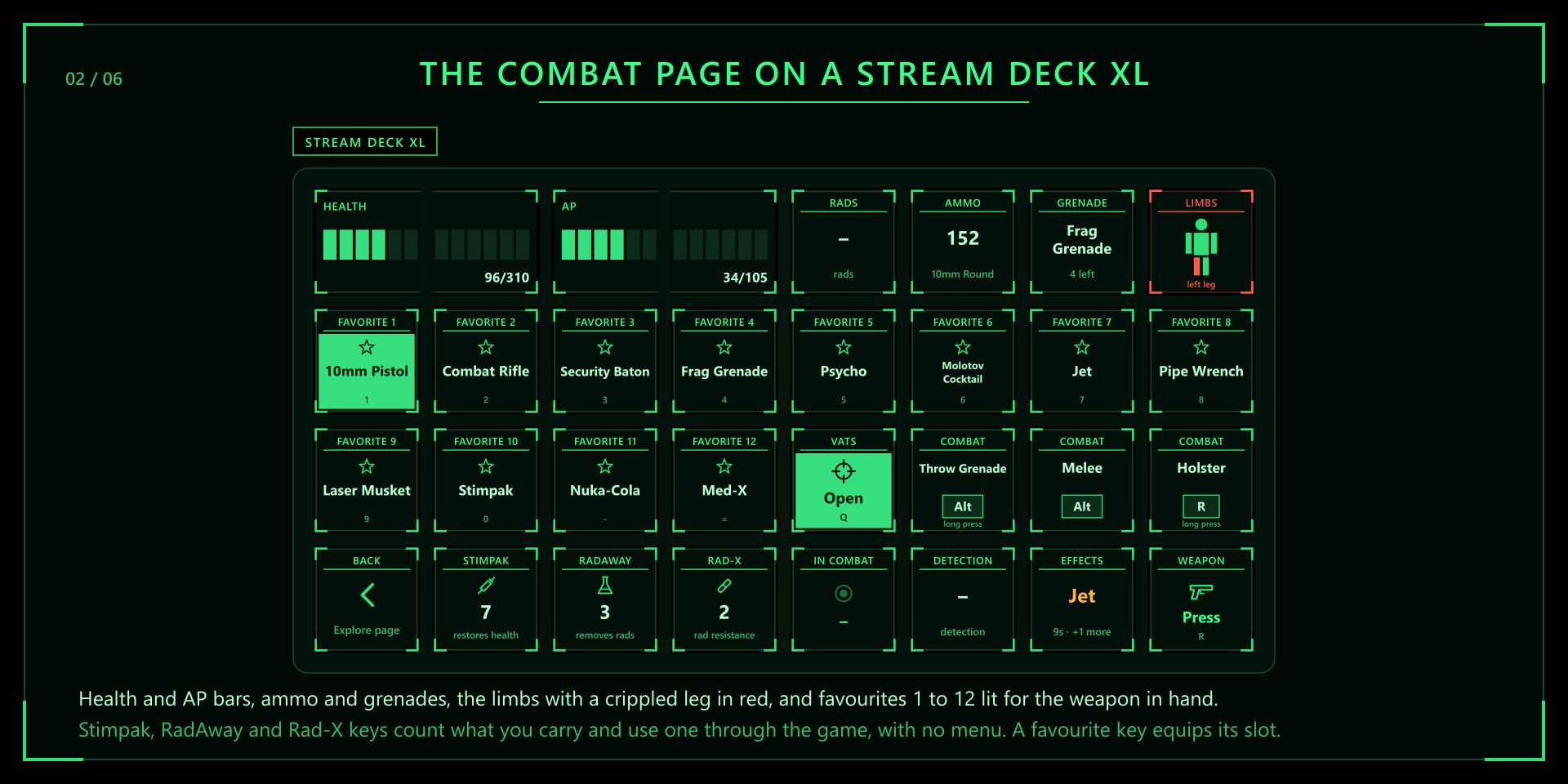
- Combat: health and AP bars, ammo and grenades, your limbs, VATS, favourites 1 to 12 (as many as your deck holds), Stimpak, RadAway and Rad-X, and your effects.
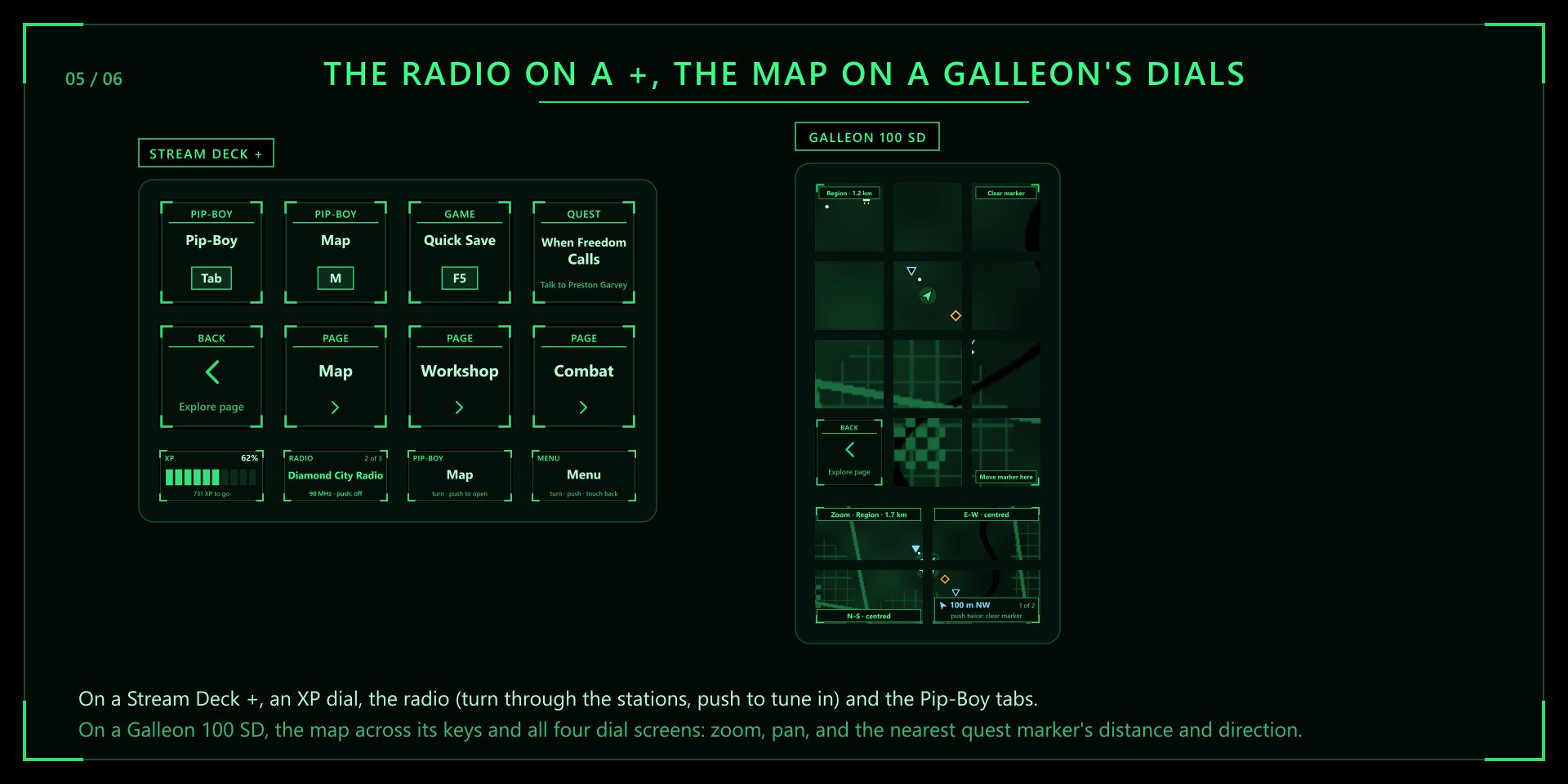
- Pip-Boy: level and XP, caps, carry weight, SPECIAL, the tracked quest, the date and time, effects, the Pip-Boy tabs, the radio, the map marker and quick save.
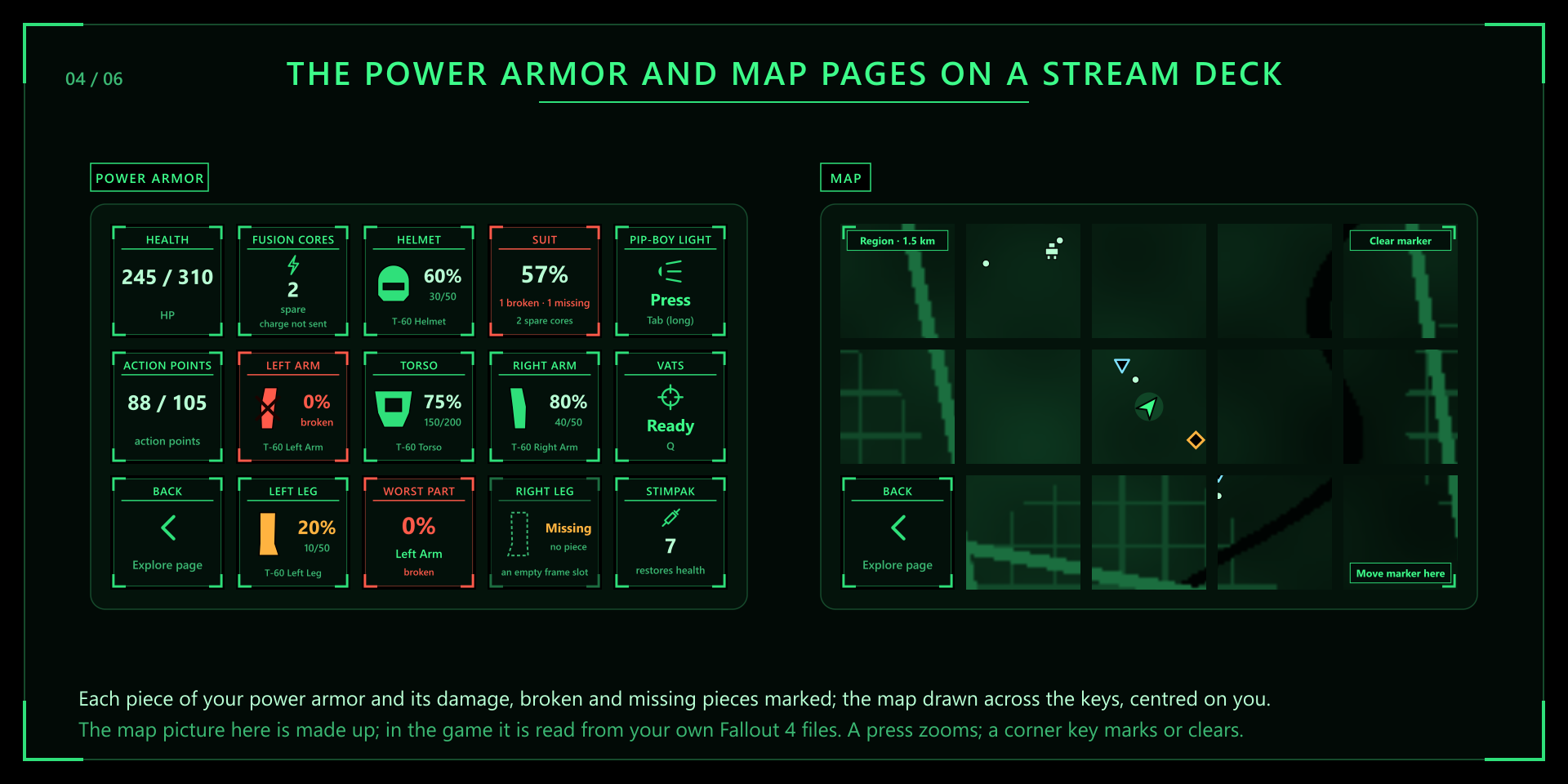
- Power Armor: each piece of your suit and its condition, broken and missing pieces marked, the worst part, the whole suit and your spare fusion cores.
- Workshop: Workshop mode, place, store and the menu arrows.
- Map: the map across your keys, centred on you (below).


There is a layout for the Stream Deck, XL, +, Mini, Neo and Corsair Galleon 100 SD, each in English, French and Spanish. Stream Deck offers them when the plugin is installed. On the + and the Galleon 100 SD the dials show health, AP or XP, turn through your favourites, the Pip-Boy tabs, the radio or VATS targets, and on the Map page they zoom, pan and find the nearest quest marker.
Follow
With the Follow key on, the deck turns to the Combat page in VATS and to the Power Armor page while you wear your suit, and back when that ends. A page you choose by hand stays put until the situation changes.
Language
Every key, dial and settings page speaks English, French or Spanish, with the game's own words. The Language setting, in any key's settings under Options (all keys), picks one; Automatic follows Stream Deck's language. What the game itself sends, the names of items, quests, stations and places, shows as the game wrote it, in the language you play in.

4. The keys and dials
- Vitals: health and AP as readouts, as bars stretched across up to three keys, or on a dial, and your limbs on a small figure, crippled ones in red.
- Chems: your Stimpaks, RadAway and Rad-X, with how many you carry. A press uses one through the game, with no menu. Push a health dial to use a Stimpak.
- Favourites 1 to 12: what is on each slot, lit when that weapon is in your hands. A press uses it.
- Readouts: level and XP, caps, carry weight, weapon and ammo, grenade, SPECIAL, the quest, the date and time, effects and addictions.
- Radio: the station it is set to, or the one playing, lit while it plays. A press tunes in or switches off. On a dial, turn through the stations and push to switch the one shown.
- Map Marker: mark where you stand, or clear the marker.
- Power Armor: a piece of your suit and its condition, the spare fusion cores, the whole suit or the worst part, on a key or a dial.
The game's Pip-Boy app does not send combat, sneak, rads, the weather, Survival needs, settlements or the fusion core's charge, so those keys show a dash. Keys that press a control for them still work.
5. Keys that press your controls
Command keys press the key you use in the game: activate, jump, sneak, sprint, grenade, melee,
holster, the Pip-Boy and its tabs, quick save, Workshop mode, VATS and its targets, the menu arrows and more,
each showing its key. Commonwealth Deck reads your ControlMap_Custom.txt in
Documents\, or else the game's default controls, and follows a rebind
at once.
- Keys go to the game only while Fallout 4 is the window in front, one press for each press of yours. Nothing is automated.
- The game's long presses stay long presses: a Throw Grenade key holds Melee, a Holster key holds Ready Weapon, and the Pip-Boy light and Workshop mode keys hold theirs.
- A control with no key, or only a mouse button, says Not bound. Give it a key in the game's Controls menu and the key picks it up.
6. The map
The Map page draws the map across every key but Back, centred on you: the places you have found, quest markers, your custom marker, your power armor and your arrow, turned the way you face. A press zooms between Area, Region and World. The top-right key clears your marker and the bottom-right key marks where you stand, each with two presses within 3 seconds, so a stray press moves nothing. On a + or a Galleon 100 SD the four dial screens show one map: zoom, pan east-west, pan north-south, and the nearest quest marker's distance and direction.
The map picture
Under the markers is the game's own world map picture, read from your Fallout 4 folder while you play. The plugin
reads it once for each game version, read only, and keeps a converted copy in
%APPDATA%\. Nothing of Bethesda's ships with the plugin, and nothing in the game
folder changes. Zoomed in to Area, the game's own local map of the ground you have explored is laid over it.
The Map picture setting, under Options (all keys), turns it off for a drawn grid. If the plugin does not find the game by itself, enter your game folder in Fallout 4 folder. The settings say where the picture came from, or why there is none.
7. Also on the XENEON EDGE
Commonwealth Deck also writes a small feed file, %APPDATA%\,
about once a second while you play. Commonwealth Dashboard, our
iCUE widget for the Corsair XENEON EDGE, reads it: your status and limbs, SPECIAL and perks, inventory, quests, the
map, the radio and your power armor, on the touchscreen under your monitor, at the same time as your Stream Deck.
Its touch buttons tune the radio, use chems and set the map marker, through Commonwealth Deck, on your PC only.
Edge feed, under Options (all keys), turns the file off, and Edge controls turns off the widget's buttons. Without a Stream Deck, Commonwealth Link writes the same file for the widget. It stands by by itself while Commonwealth Deck runs.
8. What it can and cannot do
- It reads what the game's own Pip-Boy app server sends, on this PC, as the phone app did. Nothing of ours is in the game, and nothing in the game folder changes.
- It sends the game the app's own commands (use an item, the radio, the map marker) only when you press a key, and command keys send one key press for each press of yours, only while the game is in front.
- It connects to the game on this PC. It reaches another PC only if you type its address or press Find. No account, and no internet connection.
- It writes two things, both in
%APPDATA%\: the feed for the widget, which a setting turns off, and the converted map picture. Your character's name stays out of the feed unless you tick Show the character's name.CommonwealthDeck - For the widget's buttons it listens on this PC only, and each tap needs a key written into the feed file, new each start, so a web page cannot send one.
Troubleshooting
The keys say Pip-Boy app not on.
The game is running, but its Pip-Boy app server does not answer: the Pip-Boy Companion App Enabler (AE) or F4SE
is not loaded. Check that the mod is on in your mod manager and that
Data\ is there, and start the game with
f4se_loader.exe or your mod manager's F4SE tool, not the Play button in Steam. If you turned down the
Windows firewall question, allow Fallout 4 on Private networks in Windows Security, under Firewall &
network protection, Allow an app through firewall.
The keys say another app connected, or app busy.
The game serves one companion app at a time, and another one holds that connection: Commonwealth Link, or the Pip-Boy app on your phone or tablet. Close the phone app. Commonwealth Link steps aside by itself while Commonwealth Deck writes the Edge feed; if you turned Edge feed off, quit Commonwealth Link from its tray icon.
The keys say open your Pip-Boy once.
Commonwealth Deck is connected to the game, but the game sends nothing until you open the Pip-Boy once after loading a save. Open it and close it again.
Where does the map picture come from?
From your own game files: the world map picture the game's Pip-Boy map uses, read from your Fallout 4 folder while you play. If the Map keys show a plain grid, the Map picture setting is off or the plugin did not find the game; enter your game folder in Fallout 4 folder, and the settings say what they found.
The fusion core key shows no charge.
The game's Pip-Boy app does not send the fusion core's charge, so the key shows your spare cores and says charge not sent. The pieces of your suit and their condition do come through.
The command keys do nothing.
Keys only go to the game while it is the window in front. A control with no key says Not bound: give it one in the game's Controls menu. If the game runs as administrator, Windows blocks key presses from programs that do not, so start the game normally.
Frequently asked
Can the game run on another PC?
Yes, for the readings. Enter that PC's address in Game address in any key's settings, or press Find the game on my network. Command keys press keys on this PC only.
Do I need a Stream Deck for the XENEON EDGE widget?
No. Use Commonwealth Link.
Is this made by Bethesda?
No. Commonwealth Deck is an unofficial project made by TeaTime, not affiliated with or endorsed by Bethesda Softworks or ZeniMax Media. Fallout and Pip-Boy are trademarks of ZeniMax Media Inc., named only to say what the plugin works with. No game logo, artwork, font or screenshot is used: every key is drawn in code, and the map picture comes from your own copy of the game.
Something is still wrong.
Email support@teatimeservers.ca and tell us what the keys say.