What you need
- A Linux machine you can SSH into: a server, a virtual machine, a container, a NAS or a Raspberry Pi. A Pi gives you under-voltage and throttling as well.
- Windows 10 or 11 with Stream Deck software 7.1 or newer. Any Stream Deck works; the Stream Deck + gets dials and touch strip images too.
- SSH that already works:
ssh <name>in a terminal, with a key and no password prompt. - Nothing on the machine. No agent, no service, no package.
1. Install the plugin
Submitted for approval. Pi Deck is waiting for review on the Elgato Marketplace. This page will link to the listing as soon as it is approved. It comes with ready-made pages for every Stream Deck.
For a homelab, not for production. Pi Deck is built for machines you own and sit near: a rack in the basement, a Pi on a shelf, a server under the stairs. It keeps no history, raises no alerts, and has no idea who is pressing the key. A reboot is a two-second hold away, and it will reboot whichever machine that key is set to. Lovely for a homelab. Not something to put in front of anything people depend on.
Demo profiles
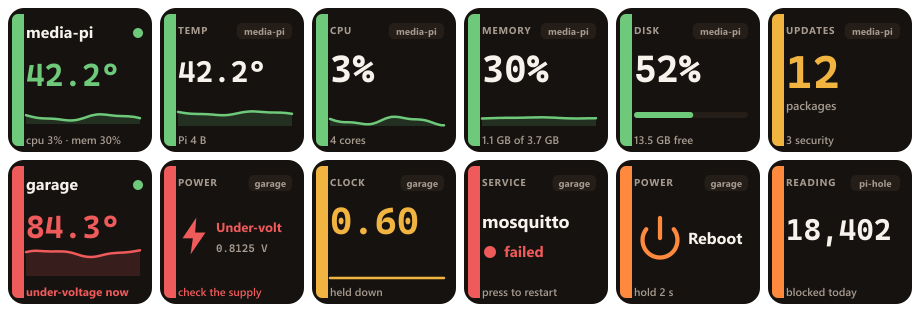
A ready-made page of Pi Deck keys for each Stream Deck. Keys with no machine picked show the first one in Your machines, so the whole page works as soon as that setting is filled in; pick a machine on any key to point it elsewhere. Download the one for your deck and double-click it to import it into Stream Deck.
- Stream Deck: 15 keys: all machines, the machine, and every reading, power health, updates and reboot
- Stream Deck Mini: 6 keys: all machines, the machine, CPU, memory, updates and reboot
- Stream Deck XL: 18 keys: every reading, power health, updates, reboot and shut down
- Stream Deck +: 8 keys and all four dials: one dial turns through the machine's readings, three turn through your machines
- Stream Deck Neo: 8 keys: all machines, the machine, temperature, CPU, memory, disk, updates and reboot
2. Point it at your machines
Drop any Pi Deck key on the deck, click it, and open Settings. Put your machines in
Your machines, written exactly the way you type them after ssh, separated by
commas. Then pick one on the key itself.
- Pi Deck runs the
sshalready on your computer, in batch mode, so it uses your~/.ssh/config, your keys and your agent, and never prompts for a password. - A key with a passphrase needs an agent running. A machine you have never connected to needs its host key accepted once in a terminal first; until then the key says host key not trusted.
- Read every sets how often a reading arrives, five seconds by default.
Rebooting, upgrading and restarting a service need root. If you log in as root, which is normal on a
container, they simply run. Otherwise they go through sudo -n, which never waits for a password,
so give your user passwordless sudo for those or the key says needs sudo. Everything the keys
show needs neither.
3. The keys
Every key is in the Pi Deck category. Leave titles empty; the keys draw their own.
| Key | Shows | A press |
|---|---|---|
| Machine | One machine: temperature with its last minute, CPU and memory, and a warning line when a Pi's power dips | Opens that machine's page |
| Reading | One number: temperature, CPU, memory, disk, load, uptime, clock, download, upload, swap, core voltage or fan, with a sparkline | Opens that machine's page |
| Power health | On a Pi: under-voltage and throttling, now and since boot, with the core voltage | Shows the raw flags |
| Updates | How many apt packages are waiting, how many are security, and whether a reboot is wanted | Refreshes the list; hold 2 s to install |
| Service | A systemd unit: active, inactive or failed | Restarts it (or starts, stops, reloads) |
| Reboot | Reboot or shut down the machine | Nothing; it needs a 2-second hold |
| Command | The first line of a command of yours, with a unit if you want one | Runs another command of yours |
| All machines | How many of your machines are answering, red if a Pi is under-volting | Opens a page with a key for each |
4. Power health, on a Raspberry Pi

This is the one reading only a Raspberry Pi has, and the reason the plugin is named after one. A Pi on a thin
cable, a long cable or a tired charger quietly slows itself down. The board records it in
vcgencmd get_throttled, and nothing in a normal dashboard reads it. The Power health
key does: Under-volt or Throttled in red while it is happening, and a line saying so when it
happened earlier in this boot. All four flags are read, each in both forms: under-voltage, clock capped,
throttled, and the soft temperature limit.
When it is happening, the rail goes red on every key for that Pi, and the clock key says held down.
5. Pages on the deck

All machines opens a page with a key for each machine: its temperature, CPU, memory bar and uptime. Press one and you get that machine's own page, every reading on its own key. Both pages are laid out for whichever deck you are on, from a Mini to an XL, and are installed as read-only profiles the first time you open one.
6. Stream Deck + dials
The touch strip is drawn in the same style as the keys: the machine, the reading, its last minute as a sparkline, and grey and then red when the machine goes quiet.
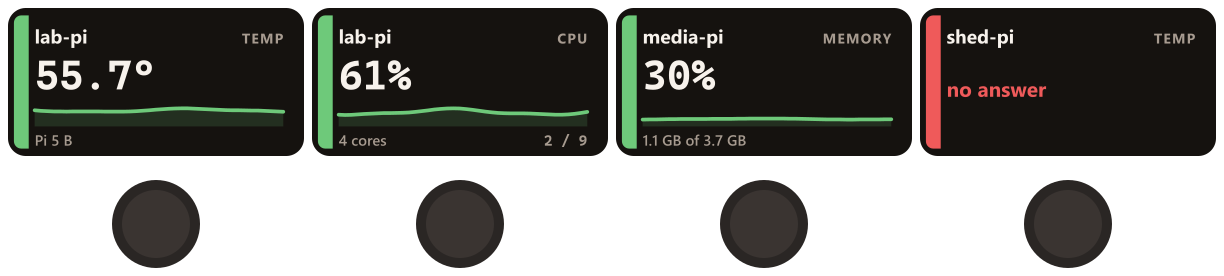
- Machine dial: turn to move through that machine's readings. It skips any the machine does not have, such as temperature on a container.
- Reading dial: turn to move through your machines, so one dial shows the same number for each of them.
- Push either to open the machine's page, and tap the strip to refresh.
A machine's own page puts temperature, CPU, memory and disk on the four dials to start with. Each dial remembers where you turned it.
7. Updates, services and reboot

- Updates counts what
apthas waiting and how much of it is security. Hold the key for two seconds and it upgrades, naming each package as it unpacks it, then says how many it installed. It runsapt-get upgrade, neverdist-upgrade, so nothing is removed behind your back. - Service reads one systemd unit and restarts it on a press. The list of units is read from the Pi itself, so you pick from what is actually installed.
- Reboot always needs the hold, whatever else is on the deck. The connection dies with the machine, which is how the key knows the command was taken, and the readings come back when it does.
8. Your own commands

Key shows is a command that runs with every reading, and its first line of output is drawn on
the key face: a queue length, a container count, a sensor, a blocked-query total, whatever it can print.
Press runs is what happens when you press. Both run in a plain shell as your SSH user, so pipes
and && work as you would type them.
Keys asking for the same reading share one run of it, and a reading runs as often as Read every, so keep it cheap.
9. Servers, containers and other Linux boxes
Pi Deck reads a Raspberry Pi the way it reads anything else, which is why it works on all of them: a server, a NAS, a virtual machine, an LXC container. It is tested that way too, against bare metal and containers as well as Pis. Only the two power readings are particular to a Pi, and they say so elsewhere.

| Reading | Raspberry Pi | Bare-metal PC | Container or VM |
|---|---|---|---|
| CPU, memory, disk, load, uptime, network | Yes | Yes | Yes |
| Services, updates, your own commands | Yes | Yes | Yes |
| Temperature | Yes | Yes, the processor's own sensor | The physical host's, where it is visible |
| CPU clock | Yes | Usually | Rarely |
| Under-voltage, throttling, core voltage | Yes | No | No |
A machine with no temperature sensor gets an overview key that leads with its CPU instead, and a temperature
key that says it has nothing to report rather than inventing a zero. If you log in as root, which is normal
on a container, the keys that reboot, upgrade or restart a service run their commands directly instead of
reaching for a sudo that such a machine often does not even have.
The temperature is the processor's. A server can publish a dozen sensors and most of them
are something else: the SSD, the graphics chip, the network card, a memory module. Pi Deck picks by name,
preferring a thermal zone that says it measures the CPU, then cpu_thermal, k10temp,
coretemp or zenpower, and only then a generic zone. The temperature key names the
sensor it settled on. On a container that sensor belongs to the physical host, because a container has none
of its own.
10. What it does on the machine
- Nothing is installed. A small shell script is written to the SSH session's own input and exists only in the shell reading it. There is no agent, no service, no cron entry and no file.
- One connection per machine, held open, however many keys are on the deck. Polling over a new SSH connection every few seconds would be a key exchange every few seconds; this is one, and then a line of readings every few seconds.
- It ends when you do. The script exits when the connection goes, however it goes, and gives up by itself after a day. A session with no key left asking for it is closed after thirty seconds.
- The numbers come from the machine's own files:
/proc/stat,/proc/meminfo,/sys/class/thermal,/sys/class/net,df, andvcgencmdfor the things only a Pi knows. - It does not go online, and the plugin's log records states and counts only: never a host name, an address, or a line of command output.
Troubleshooting

| The key says | What it means |
|---|---|
| SSH key refused | The key was not accepted. Check ssh <name> works in a terminal, and that a key with a passphrase has an agent |
| host key not trusted | This machine has never been connected to from this computer. Connect once in a terminal and accept the host key |
| The numbers have gone grey | Nothing has arrived for 30 seconds. The key says how long it has been quiet and keeps counting, rather than showing you a number that is no longer true |
| no answer / no route | The machine is off, asleep, or not reachable from here. The key keeps retrying and comes back on its own |
| unknown host | The name is not in your SSH config and does not resolve |
| needs sudo | The Pi asked for a password. Give your user passwordless sudo for that command |
| apt is busy | Something else is using apt right now, often the daily unattended upgrade. Try again in a few minutes |
| No reading on the power key | Not a Raspberry Pi, or vcgencmd is missing. Every other reading still works |
| OpenSSH not found | Windows has no ssh on the path. Install OpenSSH Client, or set the ssh command setting |
Frequently asked
Does it need root?
Not for anything it shows. Every reading comes from a file any user can read, and both
systemctl is-active and the package count, which only simulates an upgrade, work as an ordinary
user. On a Raspberry Pi, vcgencmd wants membership of the video group rather than
root, and the default Raspberry Pi OS user is already in it.
Root is only needed by the keys that do something: reboot, shut down, install updates, restart a service. Log in as root and they simply run; otherwise give your user passwordless sudo for those commands.
How quickly does a key notice a machine has gone?
For the first 30 seconds after the last reading, nothing on the key changes, so a moment of latency or a connection that drops and comes straight back never makes it flicker. After that it depends how the machine went. One that shut down cleanly has already closed its connection, so at 30 seconds the key turns red and reads offline for 30s. One that vanished without warning, a virtual machine switched off or a cable pulled, leaves its connection open and silent: at 30 seconds its numbers go grey and the key counts how long it has been quiet, and at a minute it turns red and reads offline. Either way the count keeps going, and the key comes back by itself when the machine does.
How much does it cost the machine?
One SSH connection and a shell that wakes up every few seconds to read a handful of files. The one slow part, counting waiting packages, runs every six hours by default and beside the loop, so it never holds a reading up.
Can it show a camera, or a graph of last week?
No. Pi Deck reads a machine as it is now and keeps the last minute for the sparklines. It has no database and stores no history, on your computer or on the machine.
Something is still wrong.
Email support@teatimeservers.ca with what the key says and what
ssh <name> does in a terminal, and we will take a look.