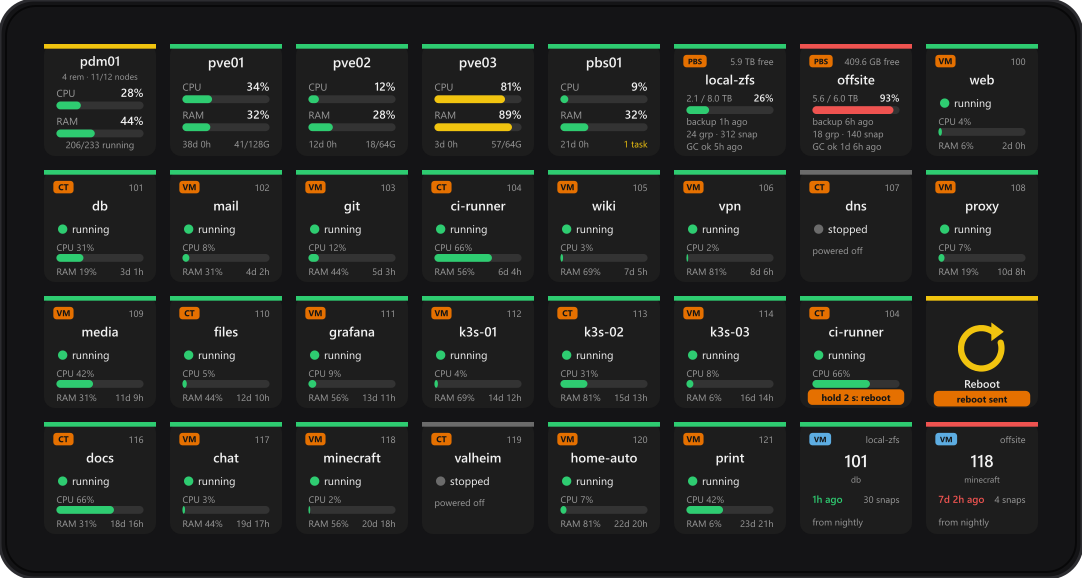
What you need
- Windows 10 or 11, or macOS 12 or newer, with Stream Deck software 7.1 or newer. It should work on a Mac, but it has not been tested on one yet.
- At least one of these, reachable from that computer:
- Proxmox VE 7 or later, a single node or a cluster (port 8006)
- Proxmox Backup Server 2 or later (port 8007)
- Proxmox Datacenter Manager 1.0 or later (port 8443), which covers every remote it manages
- An API token on each server. The plugin never asks for a password.
Any Stream Deck works: the original, Mini, XL, Stream Deck +, Neo, and Stream Deck Mobile on a phone or tablet.
1. Install the plugin
On the Elgato Marketplace. Install Proxmox & PBS Control from its Marketplace listing; Stream Deck loads it automatically and there is nothing to configure on disk.
2. Create an API token
Give the deck its own user and token, with only the rights you want it to have. The token's secret is shown once, when you create it, so keep it on screen until the connection is set up.
Proxmox VE
In a shell on any node of the cluster:
pveum user add streamdeck@pve
pveum role add StreamDeck --privs "VM.Audit,VM.PowerMgmt,Sys.Audit,Sys.PowerMgmt,Datastore.Audit,Pool.Audit"
pveum acl modify / --users streamdeck@pve --roles StreamDeck
pveum user token add streamdeck@pve deck --privsep 0
That gives the token its user's rights: reading everything, guest power (VM.PowerMgmt) and node
reboot and shutdown (Sys.PowerMgmt). Leave out either power right to keep the deck from using it,
or use the built-in PVEAuditor role for a deck that only watches. You can do the same in the web UI
under Datacenter → Permissions.
Proxmox Backup Server
In a shell on the Backup Server:
proxmox-backup-manager user create streamdeck@pbs
proxmox-backup-manager user generate-token streamdeck@pbs deck
proxmox-backup-manager acl update / Audit --auth-id streamdeck@pbs
proxmox-backup-manager acl update / Audit --auth-id 'streamdeck@pbs!deck'
A Backup Server never gives a token more than its user has, so grant both. For garbage collection and
verification from the deck, add DatastorePowerUser on /datastore; for reboot and
shutdown, Admin on /system.
Proxmox Datacenter Manager
In the Datacenter Manager's web UI, under Configuration → Access Control:
- Add a user in the pdm realm, for example
streamdeck@pdm. - Add an API token for it, for example
deck, and copy the secret. - Under Permissions, give both the user and the token a role on
/resource: Auditor for a deck that only watches, or Administrator to also start, shut down and stop guests. The Datacenter Manager has no role in between.
The Datacenter Manager talks to its remotes with its own tokens, so the deck needs nothing on the Proxmox VE servers behind it.
3. Add a connection
Drag any Proxmox key onto your deck, open its settings and expand Connections. There are three slots, A, B and C, shared by every Proxmox key, so you set each up once.
| Field | What to enter |
|---|---|
| Kind | Proxmox VE, Proxmox Backup Server or Proxmox Datacenter Manager |
| Name | What the keys call it, for example pve01 |
| Host | The address you open in a browser, for example https://pve01.example.com:8006. Without a port, 8006, 8007 or 8443 is used to match the kind |
| Token ID | User and token name together, for example streamdeck@pve!deck |
| Secret | The token's secret |
| Self-signed cert | Leave ticked if the server uses the certificate it made for itself, as a new Proxmox install does |
Refresh every sets how often the keys update, from 5 to 60 seconds. However many keys you have, each connection costs one request per refresh.
4. Add the keys
You will find five actions in the Proxmox & PBS Control category. Leave each key's title empty; the key draws its own text.
- Node: name, CPU and RAM bars, uptime and memory. Press it for a page of that node's VMs and containers. On a Stream Deck + it works as a dial: rotate for CPU or RAM, push for the web UI.
- Guest (VM / CT): VM or CT badge, ID, name, status, and CPU and RAM while running. Press it for the guest's detail page.
- Datacenter (PDM): a Datacenter Manager at a glance. It shows remotes, nodes online, CPU and RAM across every node, and guests running, and turns red when it cannot reach a remote. Press it for every node on every remote.
- PBS Server: CPU, RAM, uptime and running tasks. Press it for the Backup Server page.
- PBS Datastore: used and free space, newest backup, garbage-collection state, and group and snapshot counts. Press it for that datastore's backups.
Each key has a Connection and, for nodes, guests and datastores, a list to pick from, read from the server. On a Datacenter Manager connection the lists are grouped by remote.
5. The pages
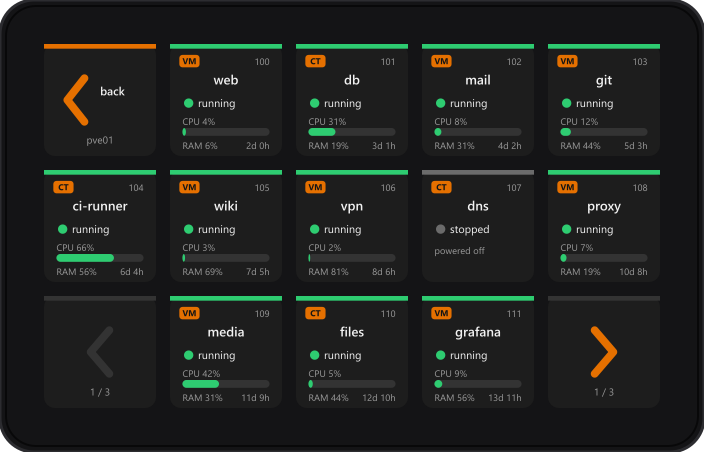
Pressing a key opens a page made for it. The pages come with the plugin as read-only profiles; the first time, Stream Deck asks permission to install them, so accept it. Back always returns you to where you came from, and arrows in the bottom corners page through long lists.
A Datacenter Manager's nodes
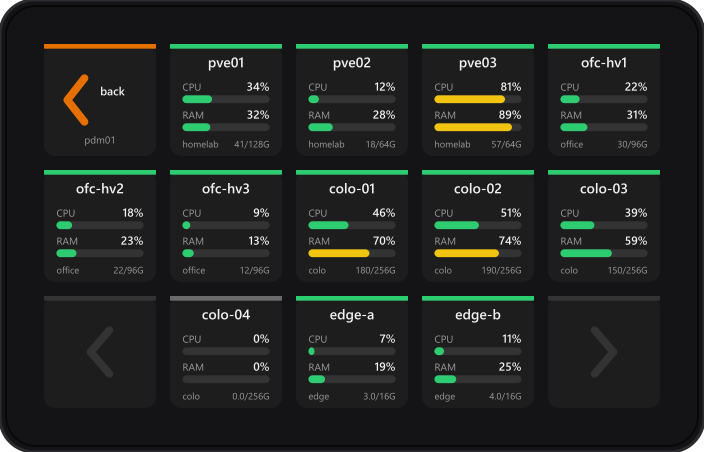
Press a node for its guests, and a guest for its detail page, all through the one Datacenter Manager connection.
A node's guests
A guest's detail page
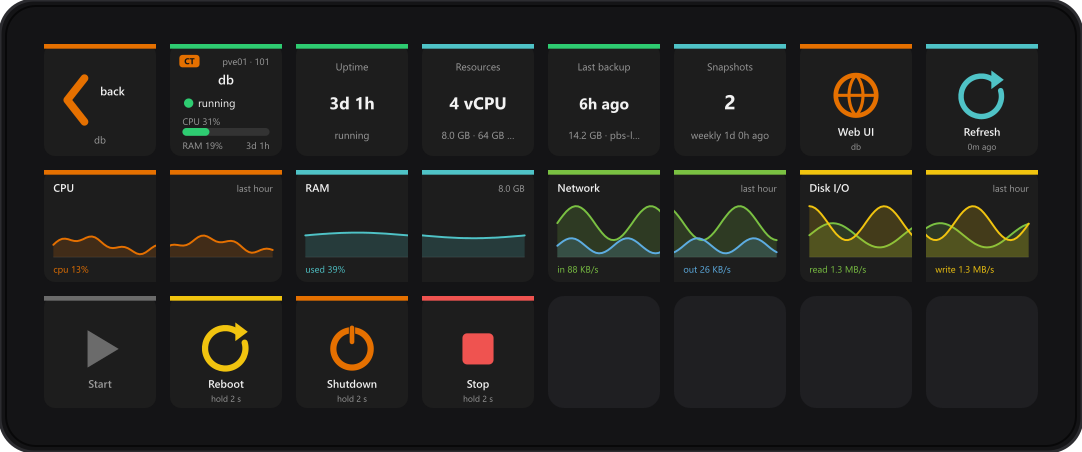
On an XL and a 15-key Stream Deck the graphs are two keys wide. Smaller decks show CPU and RAM, the newest backup and the power keys that fit.
A Backup Server
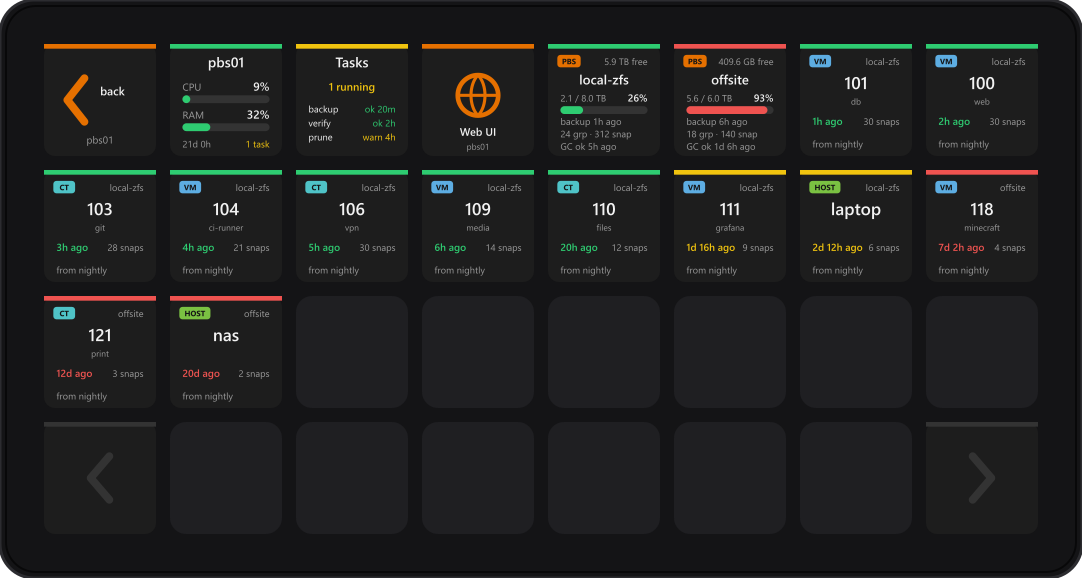
Groups turn yellow after 36 hours without a backup and red after 7 days. VM and container groups show the guest's name from your Proxmox VE connections. Press a datastore to see only its groups; Back widens the page again.
6. Hold to confirm
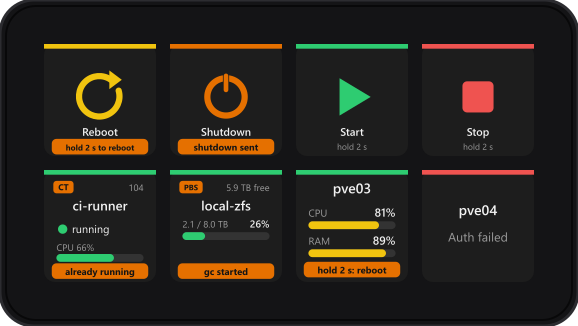
Power and maintenance actions only run after you hold the key for 2 seconds. A short press only tells you what a hold would do. Actions that do not apply, such as Start on a running guest, are refused on the key, and results and errors show on the key itself.
| Key | Hold for 2 seconds to |
|---|---|
| Guest, and the guest page and detail page power keys | Start, Reboot, Shut down (graceful), Stop (hard), or start-or-shut-down. Choose it in the key's settings |
| Node | Reboot or shut down the node, if you choose one |
| PBS Server | Reboot or shut down the Backup Server, if you choose one |
| PBS Datastore | Start garbage collection or verification |
Through a Datacenter Manager, guests can be started, shut down and stopped, but not rebooted, because its API has no reboot. Node power is not available either. For those, add the Proxmox VE server as a connection of its own.
Troubleshooting
| The key says | What it means |
|---|---|
| set up in key settings | The connection has no host, token ID or secret yet |
| Auth failed | The token ID or secret is wrong, or the token was deleted |
| No permission | The token works but lacks a right: see step 2. On a Backup Server, check the user as well as the token |
| DNS failed / Refused / Timeout | The host name, port or network path. Open the same address in a browser on this computer |
| TLS cert | The server's certificate is self-signed and Self-signed cert is not ticked |
| not a PBS connection / not a PDM connection | The key points at a connection of another kind. Change the key's Connection |
| node not found / guest not found | It was removed or renamed, or the token cannot see it. Pick it again in the key's settings |
| not via PDM / no reboot via PDM | An action the Datacenter Manager does not offer |
| 1 remote down (Datacenter key, red) | The Datacenter Manager cannot reach one of its remotes |
| no page for this deck | The device has no keys to lay a page out on, such as a Stream Deck Pedal |
Frequently asked
Does it work on a Mac?
It should. Nothing in the plugin is specific to Windows, and it installs on macOS 12 and newer. But it has only been tested on Windows so far. If you try it on a Mac, we would like to hear how it goes at support@teatimeservers.ca.
Where is my token kept?
In the Stream Deck app's own settings on your computer. The plugin only ever sends it to the server it belongs to, never writes it to a log, and needs no account or password of any kind.
Can I watch more than one cluster?
Yes. Use up to three connections, or point one connection at a Datacenter Manager and see every cluster and node it manages.
Does it change anything on my servers?
Only when you hold a power or maintenance key for 2 seconds. Everything else only reads. For a deck that only watches, give its token a read-only role.
Is this made by Proxmox?
No. It is an unofficial plugin, not affiliated with or endorsed by Proxmox Server Solutions GmbH.
Something is still wrong.
Email support@teatimeservers.ca with what the key says, and we will take a look.