What you need
- Windows 10 or 11 with the built-in OpenSSH Client. Current versions of
Windows include it; if
sshdoes nothing in PowerShell, add it under Settings → System → Optional features. - Stream Deck software 7.1 or newer.
- An SSH config at
%USERPROFILE%\.ssh\configwith your hosts in it. If you already connect by typingssh myserver, you have one.
Any Stream Deck works: the original, Mini, XL, Stream Deck +, Neo, and Stream Deck Mobile on a phone or tablet.
1. Install the plugin
On the Elgato Marketplace. Install SSH Launcher from its Marketplace listing; Stream Deck loads it automatically and there is nothing to configure on disk.
2. Your SSH config
The plugin reads the config you already have. There is nothing to import and nothing to type twice. For example, this config:
Host pve01 proxmox1
  HostName 10.0.10.11
  User root

Host minecraft
  HostName 10.0.20.5
  User mc
  Port 2222

Host web01
  HostName web01.example.com
  User deploy
  ProxyJump bastion

Host *
  IdentityFile ~/.ssh/id_ed25519
gives you three keys: pve01, minecraft and web01. The rules are simple:
- One key per
Hostline, named after its first alias.Host pve01 proxmox1is one key calledpve01; the other names still work when you type them. - Lines made only of wildcards are settings, not hosts.
Host *andHost *.corpget no key, but what they set still applies. Includefiles are followed, including patterns such asInclude config.d/*.- Edits show up by themselves within a few seconds. Add a host, save, and its key appears.
A quick test: if ssh pve01 connects when you type it in PowerShell, the key will
connect too. The plugin runs exactly that command.
3. Add the keys
You will find two actions in the SSH Launcher category.
SSH Hosts
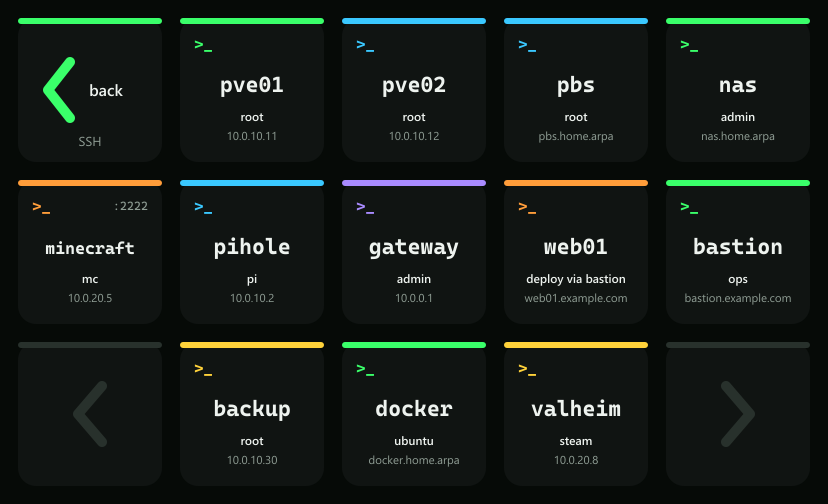
One key that opens a page with a key for every host. Drag it anywhere and press it. The first time, Stream Deck asks permission to install the host page; accept it.
On that page, press any host to connect. Back returns to where you were, and the arrows in the bottom corners page through when you have more hosts than keys. Layouts are included for every Stream Deck model, so a Mini shows three hosts at a time and an XL shows twenty-nine.
SSH Host
A key pinned to one host, for the servers you reach for most. Open its settings and choose from
Host, a list read from your config. Label is optional and replaces the alias on
the key, for example Backups instead of pbs.
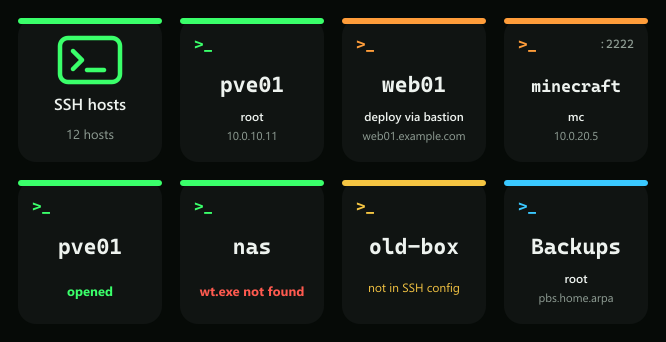
Every host key shows:
- the alias in the middle, with a colour that stays the same for that host, so a full page is easy to scan
- the user underneath, and the address it connects to
- the port in the top corner when it is not 22, and via bastion when the host goes through a jump host
Leave the key's title empty. The key draws its own text.
4. Settings
Open either action's settings and expand Settings. They are shared by every SSH key, so you set them once.
| Setting | Options |
|---|---|
| Open in | Windows PowerShell window (default), PowerShell 7 window, Windows Terminal tab |
| Session ends | Tick Close the window when ssh exits to close it. Off by default, so a failed connection leaves its error on screen |
| Host page | In the order of the config (default) or Alphabetical |
| Hide hosts | Names or patterns to leave off the host page, for example github.com, *.old |
| After opening | Tick Leave the host page to go back to your own page once a session opens |
| Config file | Leave empty for %USERPROFILE%\.ssh\config, or point it at another file. %VARIABLES% and ~ work |
5. What happens when you press a host
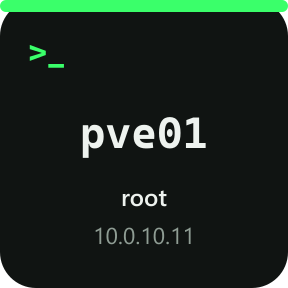
A new window opens, titled ssh pve01, running Windows' own OpenSSH client with that alias. From
there it is an ordinary SSH session: ssh reads the config, picks the key, follows the jump host and asks for
anything it needs, such as a passphrase, in the window. The key shows opened for a moment.
When the session ends the window stays open at a PowerShell prompt, unless you ticked Close the window when ssh exits. That way you can read why a connection dropped, or reconnect with the up arrow.
Sessions do not belong to Stream Deck. Windows starts them the same way it starts a program you open from the desktop, so quitting or updating Stream Deck leaves every open session running.
What the plugin can and cannot see
It reads your SSH config, and only to draw the keys. It never opens your private keys, never sees a password or passphrase, and makes no network connections of its own. Everything that touches your servers is done by ssh.
Troubleshooting
| You see | What it means |
|---|---|
| pick a host | An SSH Host key with no host chosen yet. Open its settings and choose one |
| not in SSH config | The chosen host was renamed or removed from the config. The key still runs ssh with that name; choose the host again to update it |
| No SSH config found | There is no file at the config path. Create %USERPROFILE%\.ssh\config, or check Config file |
| wt.exe not found / pwsh.exe not found | Windows Terminal or PowerShell 7 is not installed. Install it, or change Open in |
| no page for this deck | The device has no keys to lay a page out on, such as a Stream Deck Pedal |
| A host has no key | Its Host line is all wildcards, its name is already used by an earlier Host line, or it matches Hide hosts |
| The window opens, then ssh fails | The error in the window is ssh's own. Type the same ssh command yourself to work on it; the key will behave the same |
Frequently asked
Does it work on a Mac?
Not yet. It is Windows only for now.
Where do I put passwords?
Nowhere in the plugin. If a server asks for a password or a key passphrase, ssh asks in the window, as it always does. Keys and agents work exactly as they do from a terminal.
I use Git for Windows. Which ssh does it run?
Windows' own, C:\Windows\System32\OpenSSH\ssh.exe, even if another ssh comes first on your PATH.
That is the client that reads %USERPROFILE%\.ssh\config and works with the Windows ssh-agent.
Can one key run a command on the server instead?
Put it in the config with RemoteCommand and RequestTTY yes under its own
Host line, and that host's key runs it.
Something is still wrong.
Email support@teatimeservers.ca with what the key or the window says, and we will take a look.